You type a few words into an AI image generator, hit enter, and get something that looks… not quite right. The composition is off, the style isn’t what you imagined, and somehow your “photorealistic portrait” has seven fingers.
Sound familiar? The gap between what you imagine and what the AI produces almost always comes down to one thing: your prompt.
AI image generation has become remarkably powerful — tools like Midjourney, DALL-E 3, Stable Diffusion, and Flux can produce images that rival professional photography and illustration. But they’re only as good as the instructions you give them.
This guide teaches you how to write effective prompts from scratch, regardless of which platform you use.
How AI Image Generation Works (The 30-Second Version)
Understanding the basics helps you write better prompts.
AI image generators are trained on millions of image-text pairs. They learn the statistical relationships between words and visual elements. When you write a prompt, the model doesn’t “understand” your words the way a human does — it predicts the most likely image that matches your text description based on its training.
This means:
- Specific descriptions produce better results than vague ones. “A golden retriever puppy” works better than “a cute dog.”
- The model knows art styles, photography terms, and visual vocabulary. Using these terms gives you precise control.
- Word order and emphasis matter. Most models pay more attention to words near the beginning of the prompt.
The Anatomy of a Great Prompt
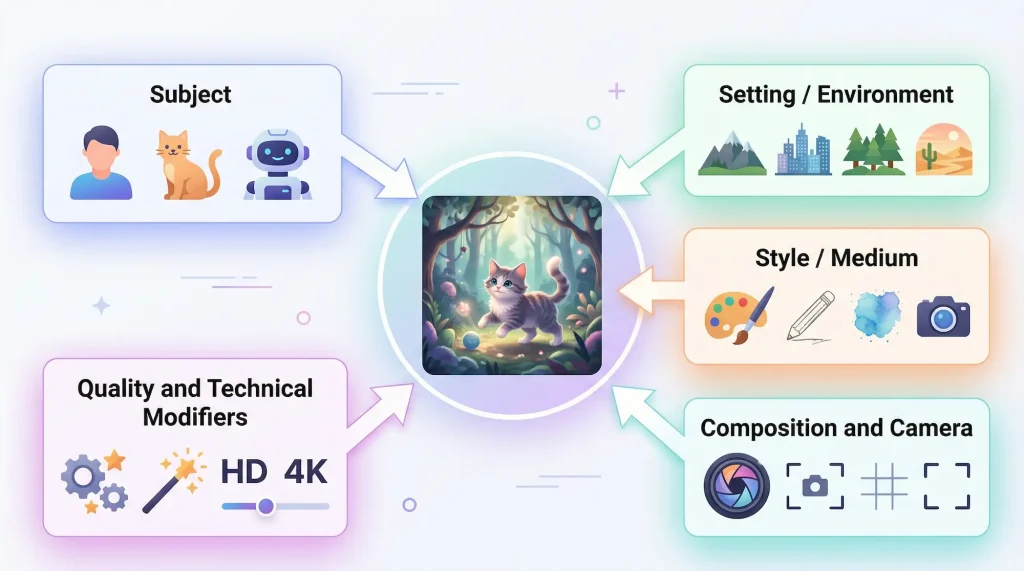
Every effective AI image prompt contains some combination of these five elements:
1. Subject
The main focus of the image. Be specific about who or what appears.
- Weak: “A woman”
- Better: “A young woman with short curly hair and round glasses”
- Best: “A Japanese woman in her 30s with a pixie cut, wearing a navy trench coat, holding a vintage film camera”
The more detail you provide about the subject, the closer the result will match your vision.
2. Setting / Environment
Where the subject exists. Context dramatically changes the mood and composition.
- “In a sunlit Tokyo alley lined with vending machines”
- “On a foggy Scottish highland at dawn”
- “Inside a minimalist Scandinavian apartment with floor-to-ceiling windows”
3. Style / Medium
This tells the AI what artistic approach to use. It’s one of the most powerful controls you have.
Photography styles:
- “35mm film photography”
- “DSLR photo with shallow depth of field”
- “Aerial drone shot”
- “Street photography, candid”
Art styles:
- “Watercolor painting”
- “Digital illustration”
- “Oil painting in the style of the Impressionists”
- “Flat vector illustration”
- “Isometric 3D render”
Aesthetic keywords:
- “Cinematic lighting”
- “Moody and atmospheric”
- “Bright and airy”
- “Dark academia aesthetic”
4. Composition and Camera
Photography and cinematography terms give you fine-grained control:
- Shot types: Close-up, medium shot, full-body shot, bird’s-eye view, low angle
- Lens effects: Bokeh, tilt-shift, fish-eye, macro
- Lighting: Golden hour, Rembrandt lighting, backlit, neon-lit, soft diffused light
- Focus: Shallow depth of field, deep focus, selective focus
5. Quality and Technical Modifiers
These push the model toward higher-quality outputs:
- “Highly detailed”
- “8K resolution”
- “Professional photograph”
- “Award-winning”
- “Sharp focus”
- “Intricate details”
Don’t overload your prompt with these — pick one or two that matter most.
Prompt Structure: Putting It All Together
A solid prompt structure looks like this:
[Subject with details], [setting/environment], [style/medium], [composition/camera], [lighting/mood], [quality modifiers]Example:
A barista with tattooed arms pouring latte art in a rustic coffee shop,
morning sunlight streaming through large windows,
35mm film photography, shallow depth of field,
warm golden tones, highly detailed
This prompt gives the AI clear information about:
- Who (tattooed barista)
- What they’re doing (pouring latte art)
- Where (rustic coffee shop)
- When (morning)
- How it looks (35mm film, shallow DOF, warm tones)
Platform-Specific Tips
Each AI platform has its own strengths and quirks. Here’s how to adapt your approach:
Midjourney
Midjourney excels at artistic, stylized images. It tends to produce aesthetically pleasing results even with shorter prompts.
Key tips:
- Shorter prompts (15–60 words) often work better than long ones
- Use
--arto set aspect ratio:--ar 16:9for widescreen,--ar 9:16for vertical - Use
--style rawfor more literal interpretations (less Midjourney “beautification”) - Use
--v 6(or latest version) for best quality - Negative prompts use
--no:--no text, watermark, blurry
Midjourney-friendly prompt example:
Cozy Japanese bookstore at night, warm lamp light, wooden shelves
overflowing with books, rain visible through glass door, Studio Ghibli
atmosphere --ar 16:9 --v 6
DALL-E 3
DALL-E 3 (via ChatGPT) is excellent at following detailed, natural language instructions. It handles complex scenes and text rendering better than most competitors.
Key tips:
- Write in natural, conversational sentences — DALL-E 3 parses complex descriptions well
- Be explicit about what you don’t want
- DALL-E 3 can render readable text in images (a rare strength)
- Specify exact compositions: “The cat is on the left, the dog is on the right”
DALL-E 3-friendly prompt example:
Create a flat vector illustration of a modern home office. A large
monitor on a wooden desk displays code. A white cat sleeps on the
desk beside a coffee mug that says "Debug Mode." Soft morning light
from a window on the left. Minimal, clean style with a pastel color
palette of light blue, cream, and sage green.
Stable Diffusion / Flux
Stable Diffusion and Flux offer the most technical control. They respond well to specific tokens and weighted terms.
Key tips:
- Use parentheses for emphasis:
(sharp focus:1.3)(weighted 1.3x) - Negative prompts are critical — specify everything you want to avoid
- Include model-specific quality tokens: “masterpiece, best quality, ultra-detailed”
- Specify exact resolutions when possible
Stable Diffusion-friendly prompt example:
(masterpiece, best quality:1.2), portrait of a woman reading in a
library, volumetric lighting through stained glass windows, (bokeh:1.1),
warm amber tones, photorealistic, 8K

Negative prompt: lowres, bad anatomy, bad hands, text, error, missing
fingers, extra digit, cropped, worst quality, low quality, blurry
Flux
Flux (from Black Forest Labs) has rapidly gained popularity for its photorealistic output and accurate text rendering.
Key tips:
- Works well with natural language descriptions
- Excellent at photorealistic scenes
- Can handle text in images reliably
- Less need for “quality boosting” keywords than Stable Diffusion
Advanced Techniques
Once you’ve mastered the basics, these techniques will take your prompts to the next level:
Negative Prompting
Telling the AI what NOT to include is often as important as telling it what to include. Common negative prompt elements:
- “blurry, low quality, pixelated” — Prevents quality issues
- “extra fingers, deformed hands, bad anatomy” — Prevents common AI artifacts
- “text, watermark, signature” — Prevents unwanted overlays
- “oversaturated, HDR” — Prevents garish colors
Style Blending
Combine multiple styles for unique results:
- “Watercolor painting meets cyberpunk aesthetic”
- “Art Nouveau illustration style with modern minimalist color palette”
- “Ukiyo-e style woodblock print of a modern cityscape”
Camera and Lens Simulation
Photography terms unlock specific visual effects:
- “Shot on Hasselblad, Kodak Portra 400 film” — Warm, slightly desaturated film look
- “Fujifilm X-T5, 23mm f/1.4, natural light” — Clean, sharp, natural feeling
- “Sony A7III, 85mm portrait lens, f/1.8” — Beautiful background blur for portraits
- “GoPro wide angle, action shot” — Dramatic perspective distortion
Lighting Recipes
Lighting makes or breaks an image:
- Golden hour — Warm, soft, long shadows. Best for portraits and landscapes.
- Blue hour — Cool, ethereal, pre-dawn or post-sunset.
- Rembrandt lighting — One side lit, triangle of light on the shadowed cheek. Dramatic portraits.
- Rim lighting — Subject outlined in light from behind. Creates separation from background.
- Neon lighting — Colorful, urban, cyberpunk feel.
- Soft diffused light — Even, flattering, overcast-day feeling.
Common Mistakes to Avoid
Being too vague. “A beautiful landscape” gives the AI no direction. Specify the type of landscape, time of day, weather, season, and style.
Contradicting yourself. “A dark, bright, foggy, clear photo” confuses the model. Pick a consistent mood.
Overloading with keywords. More isn’t always better. A focused prompt with 30–50 well-chosen words often beats a 200-word essay.
Ignoring aspect ratio. The default square format isn’t ideal for every subject. Portraits work better in 2:3 or 9:16. Landscapes shine in 16:9 or 21:9.
Not iterating. Your first prompt rarely produces the perfect image. Treat it as a starting point: analyze what worked, adjust what didn’t, and regenerate.
Building a Prompt Workflow
For consistent results, develop a personal workflow:
- Start with the vision. What would this image look like as a photograph or painting? Close your eyes and describe what you see.
- Draft the core prompt. Subject + setting + style. Keep it simple.
- Add specificity. Camera angle, lighting, details, mood.
- Add technical modifiers. Quality tokens, aspect ratio, platform-specific parameters.
- Generate and evaluate. What’s right? What’s wrong?
- Refine. Adjust the prompt based on results. Add or remove elements.
- Iterate. Repeat steps 5–6 until you’re satisfied.
Conclusion
AI image generation is a skill, not a slot machine. The difference between frustrating, random results and stunning, intentional images is prompt engineering — the art of communicating your vision to the AI clearly and precisely.
Start with the five elements (subject, setting, style, composition, quality), learn your platform’s quirks, and build a consistent workflow. Most importantly, experiment. Every “failed” generation teaches you something about how the model interprets language.
The tools are incredibly powerful. Your prompts just need to catch up.